Making videos is hard. It takes time and money. Many business owners cannot do it. They know video helps, but they are busy. I tested a new tool called Vigi Video. It says it can make a video in seconds.
You paste your website URL. It scans your pages, finds your logo, pulls your brand colors, and writes a script from your text. Then it builds a video for you. Setup was fast. The tool grabbed my logo and colors correctly.
The script was clear, but I tweaked a few lines. The scenes matched my site content. The voiceover sounded natural. The music and pacing were decent. Exporting was quick. I made a 45-second video in under five minutes.
Speed, easy setup, brand match, solid script, quick edits.limited scene control, generic stock clips, needs manual polish for complex stories. It works well for quick promos and social posts. For big campaigns, add custom edits. Let’s explore Vigi Video Review and its key features.
Vigi Video Review | Instant Website Videos Made Easy
Vigi video Pros and Cons:
Pros:
- It creates videos from a URL in seconds.
- The drag-and-drop editor is very simple.
- It automatically keeps brand colors and logo.
- It includes an AI helper for scripts.
- It has many languages and voices.
Cons:
- AI videos can be generic at first. They need human review.
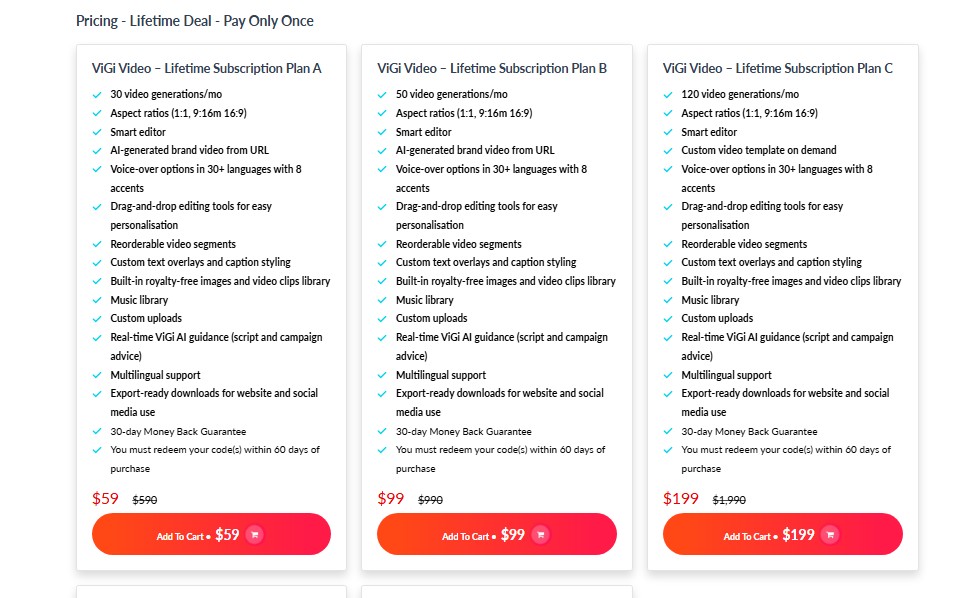
Vigi video pricing Plan:
10 Key Features of Vigi video
01. Instant Video from URL
Let’s put it this way. This is the main feature. You give Vigi video your website URL. The tool goes to your site. It reads the content. It finds your logo. It sees your brand colors. It also copies text from your pages.
Then, it creates a video script. It pulls images too. In just a few seconds, you get a full video. This video is ready to use. As I said, no editing is needed at first. This is great for fast marketing. You can make videos for all your pages.
It is a very quick starting point. To be honest, I was surprised it worked so fast. It makes content creation much simpler. You avoid all the hard planning work.
02. Brand-Consistent Visuals
The way I see it, branding is key. This tool helps keep your brand strong. When it scans your site, it learns your style. It finds your exact logo. It finds your main brand colors. It uses these in the video.
The fonts will also match your website. This means the video looks like your business. It does not look like a generic template. You know what? This builds trust. People see the video and know it is you. You want people to recognize your brand. This feature handles that automatically. You do not need to tell it your colors. It just knows. This is very smart.
03. Drag-and-Drop Customization
Okay, let me share with you. The first video is just a draft. You can change anything you want. Vigi video has a simple editor. You can move parts of the video around.
This is called drag-and-drop. You click on a scene. You drag it to a new spot. You can delete scenes you do not like. You can add new scenes. You can change the pictures. You can change the text. It is very easy for non-tech people.
You do not need to be a video editor. If you can move files on a computer, you can use this. This control is very useful. It lets you fix the video perfectly.
04. Voice-Over Options
Speaking of which, videos need good audio. This tool gives you many voice options. You can pick from many computer voices. These are text-to-speech voices. They sound very natural. You can choose from over 30 languages.
This is great for a global audience. You can also pick different accents. For example, you can choose a US, UK, or Australian accent. This helps you connect with local customers.
The voice reads the script the tool wrote. You can also edit the script. Then the voice will read your new words. This is much cheaper than hiring voice actors.
05. Music Library
Another way to improve video is music. This tool has a built-in music library. You can add background music to your video. This makes the video more exciting or professional. You can choose from many different themes.
Maybe you want music that is happy. Maybe you want music that is serious. You can find a sound that fits your brand. You also control the volume. You can make the music soft. This lets people hear the voice-over clearly.
Good music keeps people watching. You do not need to buy music tracks. They are included. This saves you more money.
06. Royalty-Free Media Library
Sometimes the tool picks wrong images. Or maybe you want a different picture. That reminds me, vigi video has a media library. This library is full of pictures and video clips. These are all royalty-free. That means you can use them in your videos legally.
You do not have to pay extra. You can search the library. Find a picture of a “dog” or “office”. Then you add it to your scene.
This replaces the image from your website. This helps you make the video story better. You can show exactly what you mean. This is a big help. It stops you from searching other sites for photos.
07. ViGi AI Assistant
Here’s the thing. Sometimes you get stuck. You might not know what to write. Or you need ideas for your video. The tool has an AI assistant to help. You can ask this AI for help. You can ask it to write a better script.
You can ask for ideas for your ad campaign. You can ask how to make the tone sound more professional. It can even give you ideas for SEO. This is like having a helper. This AI helps make your video perform better. It is not just about making a video. It is about making a good video. This assistant guides you.
08. Scene-Based Editing
If you ask me, this is very simple. The editor is not complex. It works with “scenes”. A video is just many small scenes. Each scene has text. It has a picture or video clip.
It has a voice-over part. You edit one scene at a time. This is easy to understand. You can change the text for scene one. You can change the image for scene two. You can shorten or lengthen a scene.
This is much easier than a timeline editor. Timeline editors are very confusing. Scene-based editing is perfect for beginners. You see all your scenes in a list. You just click the one you want to fix.
09. Caption and Text Overlays
I couldn’t help but notice this. Many people watch videos with no sound. They watch on their phones in public. Your video must have text on the screen. This tool adds captions automatically. The captions match the voice-over.
This means people can read what is being said. This is great for accessibility. It is also great for social media. You can also add other text. You can add a title. You can add a call to action. For example, “Visit Our Site”. This text overlay helps you get your message across. It works even if the sound is off.
10. Export-Ready Downloads
Guess what? When your video is done, you need to use it. This tool makes it simple. You can download your finished video. The video file is ready to use. You can upload it to your website. You can put it on your homepage.
You can also upload it to social media. Use it on YouTube, Facebook, or LinkedIn. The videos are made to work well on these sites. They are also mobile-friendly. They look good on phones. You do not need to convert the file. You just download and share. This lets you start your marketing right away.
Read More: RateMyService Lifetime Deal | Skyrocket Your 5‑Star Reviews
To be fair, vigi video is a very useful tool. It is for people who need videos fast. If you are a video expert, this is not for you. But, if you are a small business owner, this is great. You can make a good-looking video in minutes. The lifetime deal on AppSumo makes it a good value. You pay once and get video content forever.
The thing is, you still need to check the video. The AI is good, but not perfect. You will need to use the simple editor. You will fix some text. You will change some pictures. But this is still 90% faster than starting from nothing.
If you ask me, this deal is perfect for agencies. They can make fast videos for many clients. It is also good for bloggers. They can turn posts into videos. For the low one-time price, it is a smart buy.