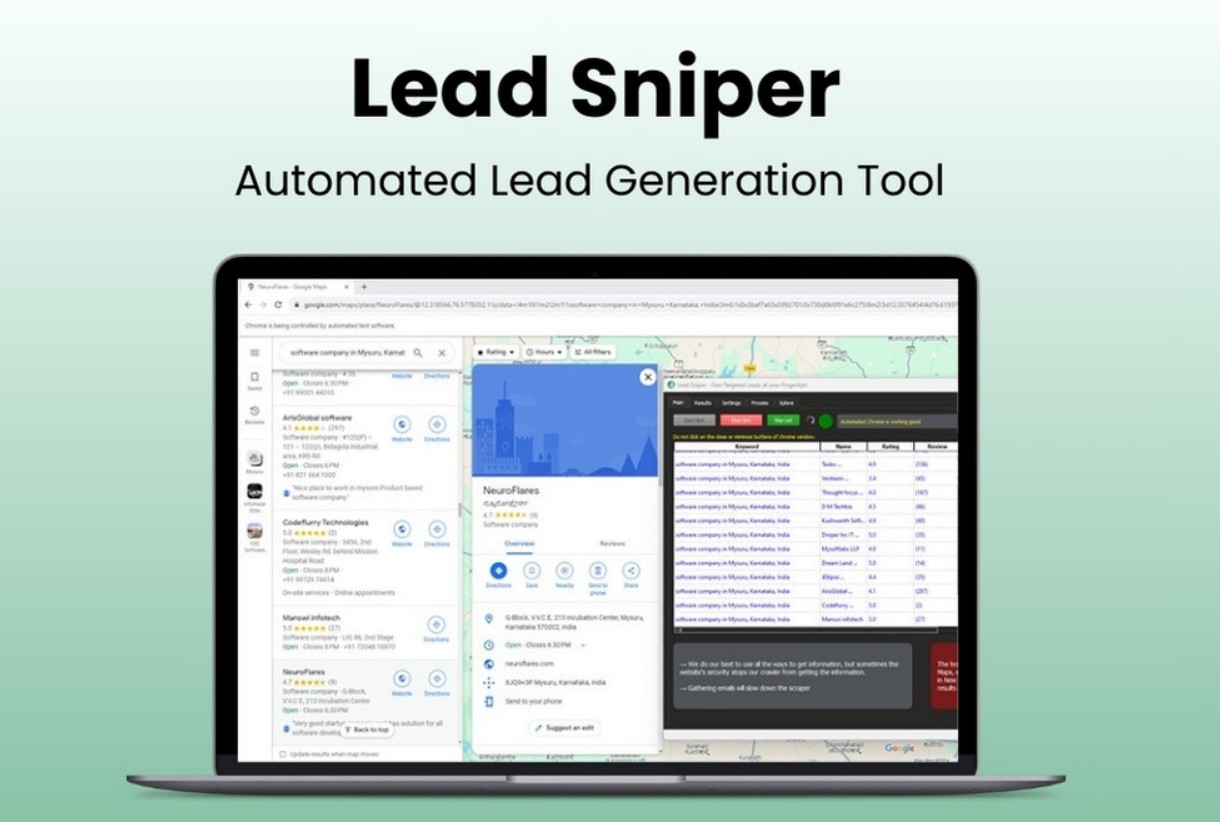
Leads-Sniper Google Maps Scraper is a simple yet powerful lead generation tool that collects business data directly from Google Maps. It helps users find potential clients, analyze competitors, and gather contact details like phone numbers, emails, and addresses. The tool is easy to use and doesn’t require coding skills. With just a few clicks, users can extract thousands of business leads from any location or category. It’s perfect for marketers, agencies, and small business owners who want verified leads fast. The best part? You can export everything in Excel or CSV format for easy use. Let’s Explore Leads-Sniper GMB Scraper.
Leads-Sniper GMB Scraper Pros and Cons :
Pros:
- Easy to use, no coding needed
- Extracts 60+ data points fast
- Finds emails and social links
- Offers lifetime access and updates
- Works for any location worldwide
Cons:
- No refunds after purchase
Leads-Sniper GMB Scraper Lifetime Deal :
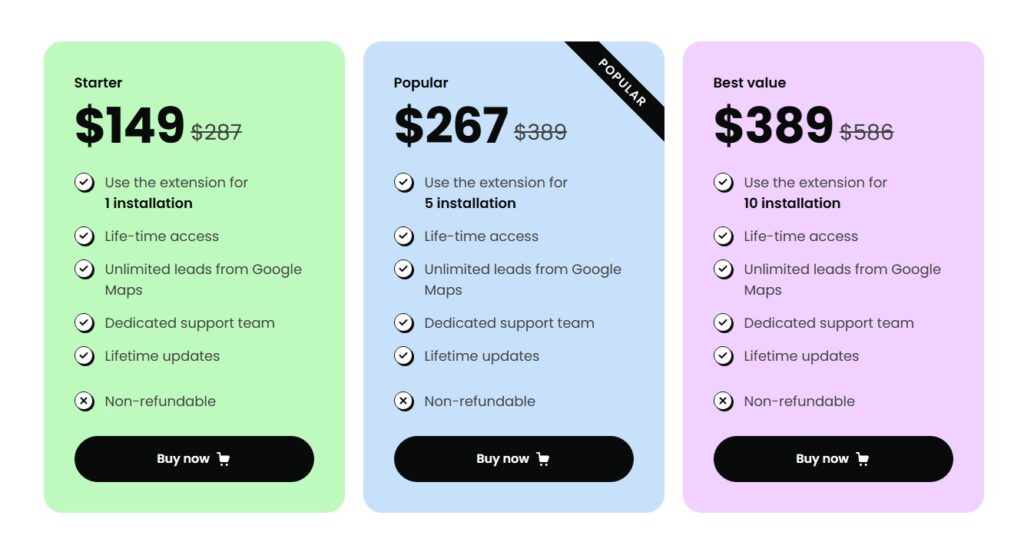
The lifetime deal for Leads-Sniper Google Maps Scraper is available for a one-time payment. You can choose from three plans based on the number of installations—1, 5, or 10. Each plan includes unlimited lead scraping, lifetime updates, and dedicated support. There are no monthly fees. Once you buy it, it’s yours forever. This makes it a smart investment for marketers and agencies who rely on consistent lead data.
10 Key Features of Leads-Sniper Google Maps Scraper
01. 60+ Data Point Extraction
This feature gives you complete business information in one go. The tool extracts more than 60 data points from Google Maps. These include business name, address, phone numbers, email, website, ratings, reviews, and even social media links.
I couldn’t help but notice how detailed the data is. It saves hours of manual research. You can even get category, price range, and service options. For marketers, this means better targeting and accurate outreach.
The way I see it, this feature turns raw data into valuable insights. It’s like having a full business directory ready for your campaigns.
02. Zero Technical Skills Required
You don’t need to be a tech expert to use it. The interface is clean and simple. You just enter a keyword and location, then hit start. The scraper does all the heavy work.
I see what you mean if you think scraping sounds hard—but this tool makes it easy. You can collect leads without writing a single line of code. Everything runs smoothly in your browser. It’s built for beginners and professionals alike.
At the end of the day, anyone can use it to build a lead list fast.
03. Unlimited Lead Generation
Here’s the thing—there’s no limit on how many leads you can collect. You can scrape thousands of businesses from any city or country. This is great for agencies that need bulk data for clients.
I was wondering how it performs with large searches, and it runs fast. No lag, no restrictions. You can keep collecting data as long as you want. The tool gives lifetime unlimited scraping rights. That means you pay once and use it forever.
For growing businesses, this is a huge advantage.
04. Social Media Profile Discovery
Speaking of which, Leads-Sniper Google Maps Scraper can find social links too. It detects connected Facebook, LinkedIn, Instagram, and YouTube profiles.
This is helpful for outreach and brand research. You can see where a business is active online. It even grabs social URLs if they’re linked on the website. That makes it easier to connect with owners or marketers directly.
Long story short, this feature turns your lead list into a full contact map. It’s perfect for social media managers and digital agencies.
05. Google Maps Scraper Chrome Extension
This Chrome extension is light and quick to install. Once added, it lets you scrape data directly from Google Maps in real time. You can search, filter, and export without leaving your browser.
I couldn’t agree more that simplicity matters. The extension runs smoothly and doesn’t slow your computer. It’s updated regularly and works with all major browsers. If you ask me, this is the easiest way to collect leads while browsing Google Maps.
06. Advanced Targeting & Location-Based Filtering
With this feature, you can focus only on the leads you want. Enter a city, zip code, or region, and the tool filters results instantly. It’s great for local SEO and area-based marketing. You can even target by category or keyword.
That means if you want “restaurants in New York” or “plumbers in London,” you can get them fast. The results are accurate and fresh. The thing is, this saves time and improves campaign results.
07. Advanced Email Discovery
Emails are often missing on Google Maps. But this tool solves that problem. It scans linked websites to find business emails automatically. If an email is listed, it grabs it for you.
I was impressed by how accurate it is. The way I see it, this helps marketers reach real decision-makers. It’s safe, fast, and reliable. You don’t need third-party email finders anymore. This feature alone makes the tool worth it for outreach campaigns.
08. Multi-Format Data Export
After scraping, you can export your data in CSV or Excel. This makes it easy to use with CRM tools or email software. The export process takes seconds. I like how organized the data looks in the spreadsheet.
Each column is labeled clearly. You can sort, filter, and analyze results without extra work. It’s simple but powerful. For teams, this makes collaboration easier. You can share files or import them into your workflow tools.
09. Lifetime Access with Multi-Installation Licensing
This deal gives lifetime access with flexible installation options. You can choose between one, five, or ten installations. Each license works on one browser or computer.
If your system changes, you can request a new key. I see your point, but lifetime access means no recurring fees. You get free updates and support forever. That’s rare these days. It’s a one-time investment that keeps paying off.
10. Precision Location & Keyword Targeting
This feature lets you find leads based on exact keywords and areas. You can search for any business type in any city. The tool then extracts only the most relevant results. That reminds me of how useful it is for niche marketing. You can target “dentists in Chicago” or “coffee shops in Paris” easily. The data is fresh and location-accurate. For local marketers, this feature helps plan campaigns that convert better.
Read More: Heffl Lifetime Deal | Simple Tools for Smooth Operations
All things considered, Leads-Sniper Google Maps Scraper is a smart choice for anyone needing fresh business leads. It’s fast, simple, and accurate. The lifetime deal makes it cost-effective for long-term use. I see your point if you’re cautious about scraping tools—but this one delivers real value. It suits marketers, agencies, and freelancers who work with local clients. If you ask me, this deal is worth grabbing before it’s gone.