Pinterest still sends free traffic to blogs and shops. But designing pins every day burns people out fast. PinBoostr fixes that. It reads your website, builds branded pins with AI, writes keyword titles, and posts them through the official Pinterest API.
No password sharing. No manual design work. The tool also watches your account health daily. When your reach drops, it warns you and slows posting so your account recovers. Most schedulers stay quiet while your traffic dies. Now it shows up on AppSumo as a lifetime deal. Let’s see if it deserves your money.
As I said, Pinterest can feel heavy for busy creators. PinBoostr is an AI Pinterest automation tool that creates, schedules, and optimizes pins from your blog posts and product pages so your traffic grows on autopilot.
You connect your Pinterest account through the official API, add your site, and let the system turn each URL into branded pin images, titles, and descriptions with strong keywords.
The thing is, it keeps a healthy posting rhythm and protects your account with pacing rules. You stay in control with optional review-before-publish, so every pin can match your brand voice. At the end of the day, PinBoostr helps you post consistently without living inside Pinterest.
PinBoostr Pros and cons:
Pros:
- AI turns URLs into pins fast.
- Growth Brain keeps posting steady.
- Pacing rules protect account reach.
- Free plan lowers entry risk.
- Lifetime deal can cut long‑term costs.
Cons:
- Pinterest‑only focus may not fit brands needing many networks.
Pinboostr AppSumo Lifetime deal:
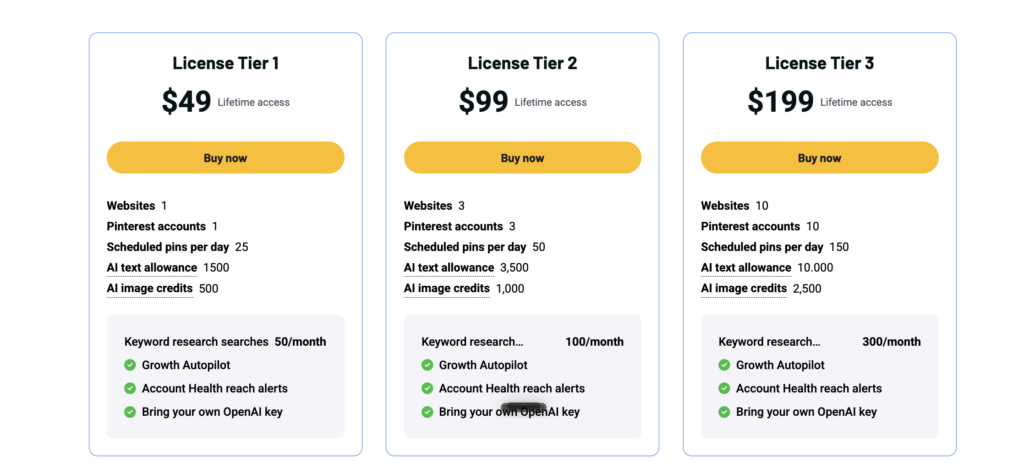
Radar deals also change often. Founders can adjust price and limits without notice. Site refunds run on a 14-day guarantee through Dodo Payments. AppSumo refunds run 60 days. Different systems, different rules. A $49 lifetime deal against the $19.99 Starter plan pays back in under three months. This one launched in February 2026. Lifetime access only holds value if the company survives.
10 Key Features And Capabilities:
01: One‑click Pinterest connection
Let me think. Most tools make setup slow and confusing. PinBoostr keeps it simple with one‑click Pinterest connection through the official Pinterest API. You log in once, approve access, and your account connects safely.
No messy manual tokens. No strange workarounds. Official API support means clear rules and safer automation for long‑term growth. The way I see it, this matters for account health. Many users worry about spam flags.
PinBoostr respects Pinterest limits with smart posting caps and pacing rules tied to that API. Growth Brain uses this connection to scan your site, score pages, and decide what to pin next.
On a daily basis it checks boards, timing, and keywords before publishing. In my opinion, one‑click connection saves time and trust. You start fast and keep control without complex tech steps.
02: URL‑to‑pin creation
I couldn’t help but notice this is where PinBoostr stands out. You paste a blog post or product URL and the tool creates ready‑to‑publish pins from that page.
It reads your content, pulls key ideas, and designs multiple pin images tuned to your brand colors, fonts, and style. It also writes keyword‑rich titles and descriptions for Pinterest SEO, so each pin can rank for strong search terms.
The funny thing is, most other tools expect you to upload designs manually. PinBoostr flips that. Your website becomes the source. Growth Brain scores each page and chooses the best opportunities first.
As far as I know, this helps bloggers, affiliate marketers, and eCommerce stores reuse existing content fast. Long story short, URL‑to‑pin creation turns every solid article or product into many Pinterest assets with almost no extra work.
03: Auto board matching
Guess what. Many users lose time picking boards for every pin. PinBoostr handles that with auto board matching inside its automation engine. Growth Brain checks each pin’s topic, keywords, and content type.
Then it chooses the board that fits best on your account. This reduces wrong placements and messy feeds. It supports per‑board rules and avoids flooding one board with back‑to‑back posts. I see your point, but people still need control.
So PinBoostr offers review‑before‑publish mode. You can approve, edit, and move pins before they go live. The way I see it, auto board matching saves mental effort daily. You keep a clean Pinterest profile that feels curated, not random.
For agencies and multi‑site owners, this matters even more. Many boards, many topics. Auto matching cuts errors and keeps the strategy aligned without manual sorting every day.
04: Review‑before‑publish control
Now that you mention it, blind automation scares many creators. PinBoostr solves this with review‑before‑publish control. You can run full autopilot or choose to approve every pin before posting. Growth Brain creates the pin drafts from your URLs.
Then you see images, titles, descriptions, and boards in a clear queue. You tweak text, change boards, or remove pins that feel off. This keeps your voice consistent and avoids awkward posts. In my opinion this flexibility is key.
On some sites you may trust full autopilot. For client work you may want tight control. PinBoostr lets you switch modes without breaking the workflow. You know what, this balances speed with quality. Pinterest rewards fresh pins and steady activity. Review control means you hit those goals while keeping every post on brand.
05: Optimal posting times
As a matter of fact, timing changes results on Pinterest. PinBoostr watches impressions, saves, and clicks to learn which posting windows work best for your account. The Growth Brain uses this data to spread pins across the day at healthy times. It avoids noisy bursts and long gaps. This helps Pinterest see consistent activity.
I was wondering how it handles new accounts. PinBoostr warms them up with lower caps and gentle pacing so they grow safely. At the present time, this is a common risk with generic schedulers. They post too much, too fast.
PinBoostr’s smart timing rules protect reach and long‑term health. Weekly emails show performance so you can see which days and hours bring saves and clicks. All things considered, optimal posting times bring more traffic from the same content and limit burnout.
06: Per‑account pin limits and pacing rules
To be fair, Pinterest can punish spammy posting. PinBoostr adds per‑account pin limits and smart pacing rules to keep your profile safe. You set daily pin caps from 15 up to 150 or more depending on your plan.
Growth Brain then spaces posts with per‑URL, per‑board, and per‑keyword controls. It avoids repeating the same page too often or stacking pins back‑to‑back on one board. Account Health reaches alerts and watches your performance daily.
If reach drops, PinBoostr explains why in plain language and slows posting so the account can recover. Correct me if I’m wrong, but most simple schedulers ignore this risk. They chase volume only. PinBoostr tries to grow and protect at the same time. For marketers who rely on Pinterest traffic, these safety rails matter now and in the near future.
07: Impressions, saves, and top pins reporting
Let’s put it this way. You need clear data to improve Pinterest content. PinBoostr tracks impressions, saves, pin clicks, and link clicks for your account. It flags top pins so you can see which designs, topics, and keywords work best.
Weekly performance emails summarize reach and engagement so you don’t live inside dashboards. With the help of these reports, you adjust your blog topics and product focus. If one collection or article drives strong saves, you double down.
I see what you mean about complexity. PinBoostr tries to keep metrics simple and useful.
Engagement rates, saves, and clicks. No confusing charts. In the majority of cases this level of reporting is enough for solo creators, bloggers, and small shops. It shows what to post more and what to pause without a heavy analytics stack.
08: Growth Brain autopilot mode
Here’s the thing. The Growth Brain is the heart of PinBoostr. It scans your website, scores pages, creates pins, matches boards, and posts them on autopilot. You define limits and style. The Growth Brain handles repetitive work every hour.
It chooses which URL deserves a pin, which board fits, and when to publish so queues stay full for weeks ahead. It uses built‑in Pinterest keyword research to feed titles and descriptions with strong search terms.
Account‑safe pacing keeps posting steady without trigger spam filters. To cut a long story short, Growth Brain turns your site into a living Pinterest machine.
You keep options for manual control and design, but you don’t need to touch every pin. For busy founders and agencies, this autopilot mode often becomes that quiet worker always pushing traffic.
09: Free Pinterest keyword research tool
If I’m not mistaken, keywords sit at the center of Pinterest SEO. PinBoostr includes a free Pinterest keyword research tool that many users can access. It finds long‑tail keyword ideas, labels intent, and surface trend signals.
You get pin title angles and topic ideas mapped to your niche. Then you can generate pin copy, plan boards, and publish campaigns through Pinterest’s official API inside PinBoostr. The way I see it, this helps both free users and paying customers.
Even before you commit to a plan, you can study what people search for and how fast certain topics grow. On a daily basis, these keywords feed Growth Brain and manual pins alike. Strong search intent plus solid designs equals better reach.
Many tools charge for this separately. PinBoostr bakes it into the platform and keeps it linked to your publishing workflow.
10: Multiple accounts, sites, and plans
Just between you and me, Pinterest work rarely stays simple. Bloggers add new sites. Agencies add many client accounts. PinBoostr supports multiple Pinterest accounts and websites across its plans.
Starter includes one account and one site. Growth raises that to two of each. Pro supports three, and Agency goes up to ten accounts and ten sites. On AppSumo, lifetime tiers follow a similar pattern, with 1, 3, or 10 websites and accounts depending on the license. With regards to pricing, PinBoostr offers a free starter plan plus monthly and yearly paid plans.
You scale pins per day, AI images, content generations, and keyword research as you grow. All things considered, this flexibility helps solo creators, eCommerce stores, and agencies pick the right level without overpaying early.
Read More: PosteAhora Lifetime Deal | AI Agent Social Publishing Tool
Let’s face it, Pinterest deserves more attention from content‑driven marketers. PinBoostr gives a focused way to treat Pinterest as a stable traffic engine without turning your week into manual pin work.
Growth Brain, URL‑to‑pin creation, keyword tools, and Account Health alerts combine into a clear system for busy creators.
If you ask me, the AppSumo lifetime deal makes the most sense for bloggers, affiliate marketers, eCommerce stores, and agencies who plan to post daily and treat Pinterest as a key channel long term. Casual users may stick with the free or Starter plan. PinBoostr remains best where steady posting meets strong content and clear growth goals.
PinBoostr AppSumo lifetime deal review. AI Pinterest automation creates, schedules, and optimizes pins from URLs to grow traffic safely and consistently.