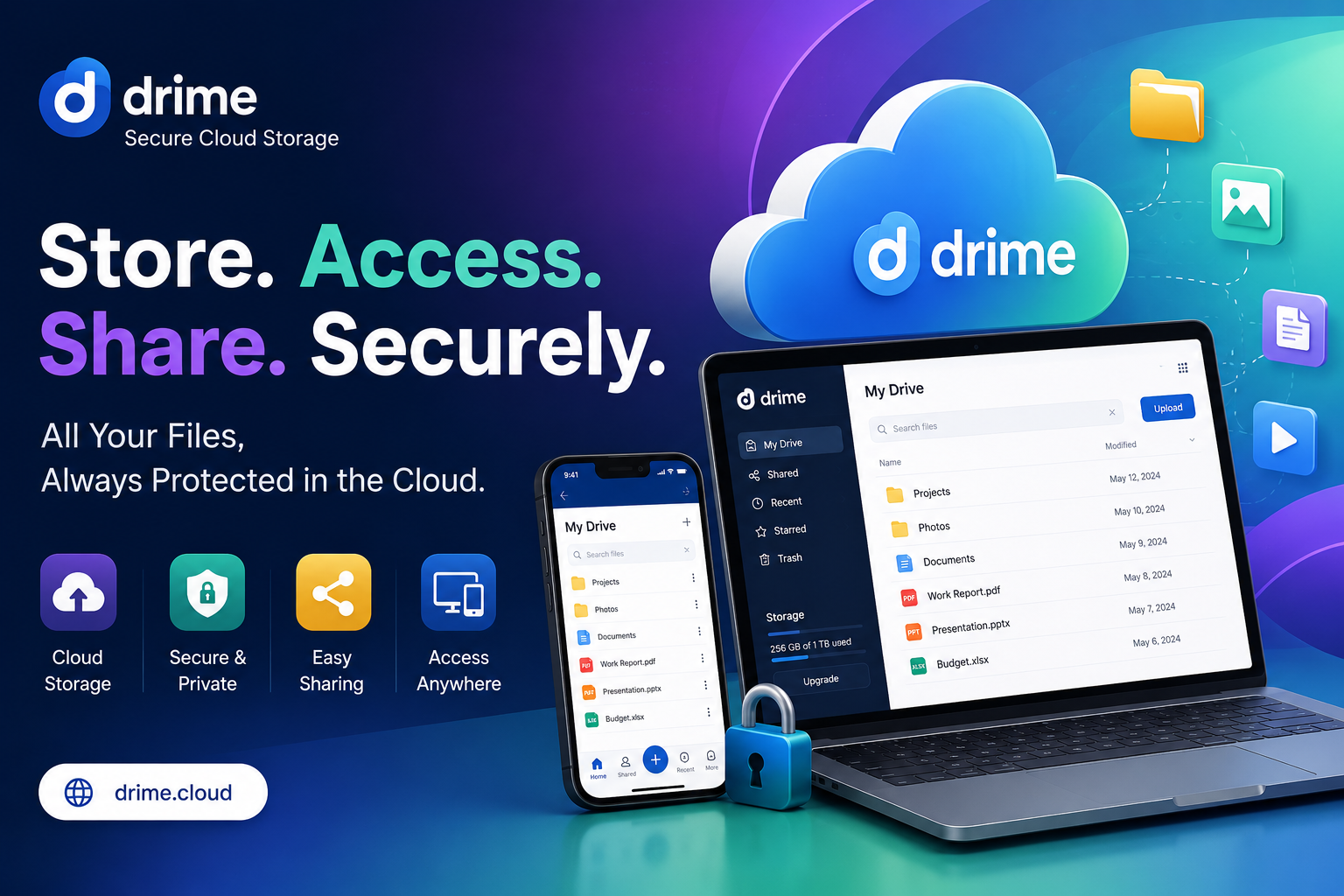
Drime Cloud is a secure online storage and teamwork platform. You upload files, share them, and work on them with others. It keeps documents, photos, and videos in one place. Files stay locked with strong encryption. You get a private vault for sensitive items. Built-in tools let you edit documents and sign PDFs. Video files stream fast with clean previews.
Clients can view and comment without making an account. Teams get shared folders with clear permissions. Think of it as storage plus a small office suite. One login replaces several paid subscriptions you already pay for. Learn more on the Drime homepage.let’s start Drime Cloud Lifetime Deal Full Review.
Drime Cloud Lifetime Deal | Secure Storage With Built-In Signing
Common Use Cases
Freelancers store client work and send signed contracts from one place. Video editors upload big files and collect timestamped feedback fast. Design agencies share password-protected galleries with expiry dates.
Remote teams keep shared folders organized across countries. Consultants protect sensitive documents inside the zero-knowledge vault. Photographers deliver heavy RAW folders without a transfer subscription.
Course creators host lesson videos and gather student notes. Small law firms keep client papers encrypted with version records. Marketing teams approve creative assets inside comment threads. Solo founders replace three subscriptions with one storage account. Anyone tired of email attachment limits finds daily use here.
Key Benefits
You pay once and drop several monthly bills. Storage, signing, sharing, and review live under one login. Encryption protects files without extra setup steps. Clients access shared work without creating accounts.
That removes friction from every delivery. Access analytics tell you when work gets viewed. Expiring links close old security holes automatically. Version history saves you from bad edits. Team folders end the file-hunting problem.
Big transfers move without third-party tools. European hosting appeals to privacy-focused users. The interface stays simple enough for non-technical clients. Long story short, fewer tools mean fewer passwords and fewer invoices.
Drime Cloud Pros And Cons:
Pros
- Encryption and a zero-knowledge vault protect sensitive client files
- Built-in PDF signing removes a separate signing subscription
- Timestamped comments speed up video and design feedback rounds
- Large transfers work without WeTransfer or similar paid tools
- One-time payment replaces several recurring monthly software bills
Cons
- Feature depth trails Google Drive and Dropbox in some areas
Drime Monthy Pricing Plan:
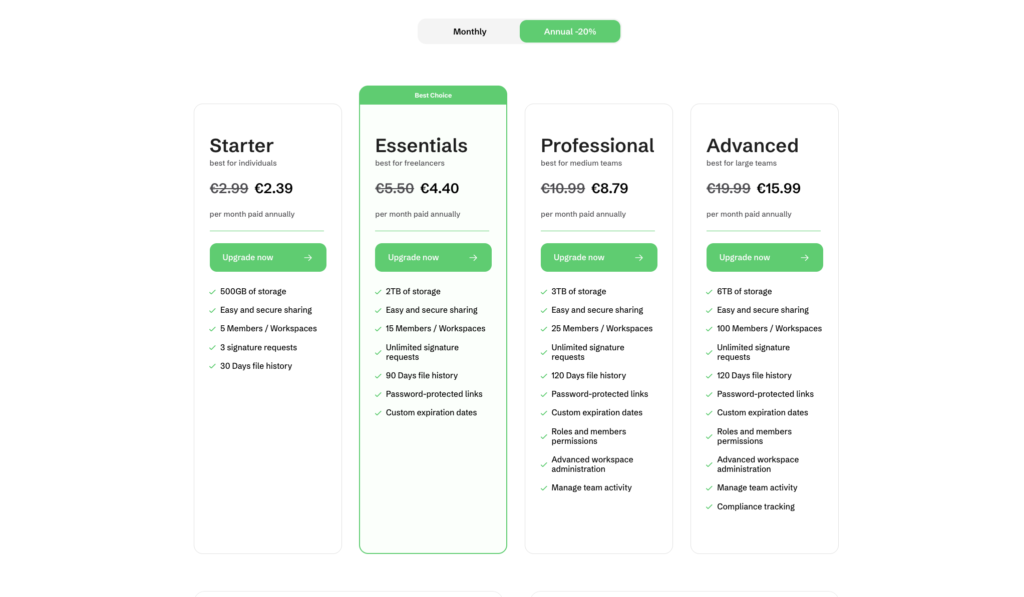
Drime’s pricing is structured to stay affordable while scaling cleanly from solo users to large teams. You get a 20GB free forever plan to test the platform and handle light personal use, then four paid tiers billed annually with a clear 20% discount versus standard monthly rates.
Starter, aimed at individuals, offers 500GB of storage, 5 members, basic e‑signatures, and 30‑day file history at €2.39 per month paid annually. Essentials targets freelancers with 2TB, 15 members, unlimited signature requests, and extra sharing controls at €4.40 per month.
Professional steps up to 3TB, 25 members, longer file history, and advanced workspace administration at €8.79 per month. Advanced is built for larger teams, with 6TB of storage, up to 100 members, compliance tracking, and full admin capabilities at €15.99 per month. For bigger organizations, an Enterprise option is available with custom pricing and tailored support.
Drime Cloud lifetime deal :
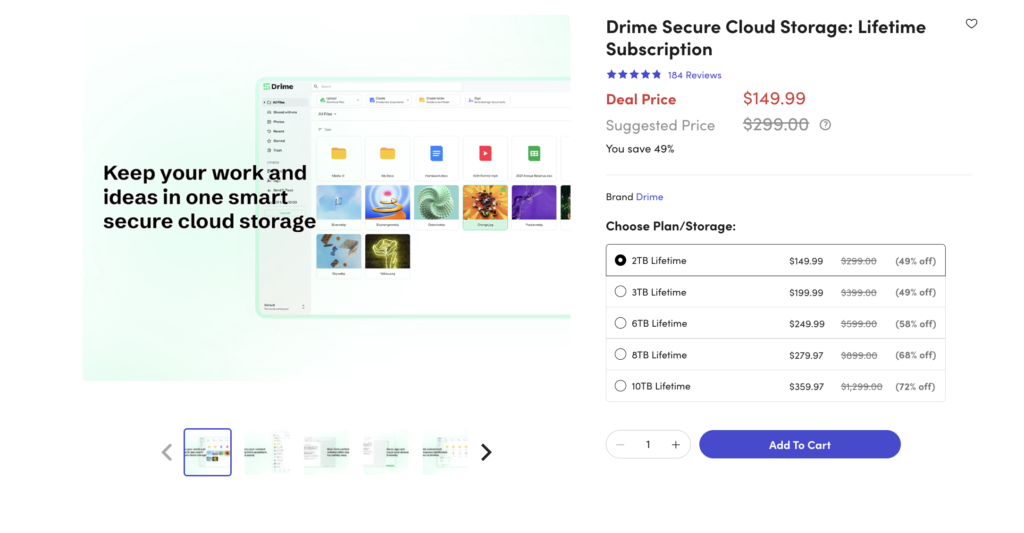
Drime’s lifetime deal on StackSocial offers a compelling alternative to endless monthly subscriptions. The Essentials 2TB plan is available for a one-time payment of $112.49, down from a suggested price of $299.00, making it 62% off. Higher tiers scale up to 10TB for $359.97, with discounts reaching 72% off on the largest plan.
Every tier includes EU-hosted, GDPR-compliant storage, unlimited file size uploads, and an end-to-end encrypted Vault using 256-bit AES and SSL/TLS encryption.
Users also get built-in document and media editing, e-signatures via Drime Sign, advanced link sharing with passwords and expiration dates, and 120 days of file version history. With a 4.8/5 rating from 152 verified reviews, buyers praise its fast uploads and rich feature set as a strong Google Drive or OneDrive alternative.
10 Key Features And What They Actually Do:
01. AES-256 Data Encryption
Your files get scrambled with AES-256 encryption. That standard protects bank records and government files. Nobody reads your data without the key. Drime applies this at rest and during transfer. So a file stays protected on the server. It also stays protected on the way there. To be honest, most people skip this detail.
Then one leaked invoice ruins a client relationship. I have seen it happen to a freelance friend. Her shared folder had no protection at all. Strong encryption removes that worry from your daily work.
You upload contracts, tax papers, or client photos without stress. The setup requires zero technical steps from you. Encryption runs by default on every single upload. No toggle. No settings page hunt. For agencies handling client data, this feature alone justifies a look. Small teams get the same protection big companies pay for.
02. Zero-Knowledge Private Vault
The private vault works differently from normal folders. Zero-knowledge means the company cannot read what sits inside. Only you hold the key to open it. Staff cannot peek. Support cannot peek. Drime built this for your most sensitive material. Passport scans. Legal agreements. Financial records. Business plans you never want leaked.
Here’s the thing about regular cloud drives. The provider technically can access your stored content. Zero-knowledge closes that door completely. You drop files in the vault like any folder.
The extra protection happens in the background. One warning worth repeating: lose your key, lose your access. No reset button exists by design. That is the trade-off with true zero-knowledge storage. Save your recovery details somewhere safe and offline. For lawyers, accountants, and consultants, this vault carries real weight.
03. Password-Protected Shared Links
Sharing a link feels easy. Sharing it safely feels harder. Drime lets you attach a password to any shared link. The recipient enters that password before viewing anything. Forwarded links stop working for strangers without the code. That small step blocks a lot of accidental leaks.
I use this for client deliverables every single week. Design files go out with a password sent separately. One message carries the link. Another carries the code. Simple habit. Big protection gain.
You set the password during the share step. No extra menu digging required. Change it later if a project ends badly. Remove it if the file becomes public material.
For photographers sending galleries, this keeps previews private. For agencies sending contracts, it keeps terms private. Freelancers avoid the awkward “who shared this?” conversation entirely.
04. Expiration-Based Link Access
Links live forever unless you kill them. That creates a slow security problem over time. Old share links pile up in old emails. Someone finds one two years later. They open your pricing sheet from a dead project.
Drime Cloud fixes this with expiring links. You pick a date. The link dies on schedule. No manual cleanup needed from your side.
Set seven days for a client review. Set thirty days for a long project. Set one day for a sensitive quote. The control sits with you every time.
I pair this with password protection often. Two layers beat one layer. A leaked link expires anyway.
Consultants love this for proposal sharing. Recruiters use it for candidate documents. Anyone sending time-sensitive material gets real peace of mind here.
05. Detailed Access Analytics
Guessing wastes time. Analytics removes the guessing completely.Drime shows you who opened your shared link. It shows when they opened it. It shows how many times. Download counts appear too. Last month I sent a proposal to a prospect. Silence for four days. Analytics showed three opens on day one. That told me interest existed.
My follow-up email got a reply. Sales teams read these signals daily. Freelancers use them before sending reminder emails. Agencies confirm a client actually received the deliverable.
The dashboard stays simple to read. No confusing charts. Just clear numbers and timestamps. You also spot odd activity fast. Forty views on a private contract raises questions. Access analytics turns your storage into a light tracking tool. Small features. Surprisingly useful in real client work.
06. Large File Transfer Capability
Email attachment limits frustrate everyone. Twenty-five megabytes stops most real work cold. Video editors move ten gigabyte project files. Photographers send four gigabyte RAW folders. Architects share heavy CAD drawings. Normal email cannot touch these jobs. Drime handles big transfers without breaking. You upload once. You share a link. The recipient downloads at their own pace.
No WeTransfer subscription needed on the side. No zip file splitting tricks. No “please use my Dropbox instead” messages.
Uploads resume if your connection drops mid-transfer. That saves your afternoon on a slow café Wi-Fi.
Recipients need no account to download. They click. They save. Done.For creative professionals, this replaces a paid transfer tool completely. That is one less monthly bill on your card. Video teams gain the most value from this single feature.
07. Collaborative Workspace Folders
Solo storage works fine for solo people. Teams need shared spaces with rules. Workspace folders let your whole team work together. Everyone sees the same current files. No more “final_v3_REAL_final.docx” chaos in email threads. You control who does what. Some members only view. Some members edit. Some members manage the folder. Permissions stay clear and easy to set. New team member joins Monday? Add them to the workspace. They see everything relevant instantly. No file forwarding marathon required. Someone leaves the company? Remove access in one click. Your files stay where they belong.
I ran a five-person content team this way. Writers dropped drafts. Editors picked them up. Designers grabbed approved copies. Nobody asked “where is that file?” anymore. Small agencies get real structure from this. Remote teams get shared ground across time zones.
08. Timestamped Review Comments
Feedback on video files usually turns messy. “Fix the part around the middle” helps nobody.
Timestamped comments solve that mess. Your client watches the video. They click at 2:14. They type their note. The comment locks to that exact second.
You open the file. You see every note pinned to its moment. Jump straight to each fix.
Video editors save hours with this. Course creators collect student feedback cleanly. Marketing teams approve ad cuts faster.
Clients need no account to comment. Send the link. They watch and type. That low barrier matters a lot.
Notes stay attached to the file version. History remains readable later.
Come to think of it, this feature alone replaces a separate review tool. Frame.io style feedback inside your storage. For any team producing video, that combination saves real money monthly.
09. Version History And File Restore
Mistakes happen on Friday afternoons. Someone overwrites the good file with a bad one.
Version history saves you there. Drime keeps older copies of your documents. Open the history. Pick the version you want. Restore it in seconds.
Ransomware protection comes as a side benefit. Encrypted files get rolled back to clean copies. Accidental deletions get recovered too. The trash holds files for a set period. Pull them back before that window closes. I restored a client contract once after a bad edit. Two clicks. Ninety seconds. Crisis over. Teams need this more than solo users. More hands mean more accidents. Version history removes the blame conversation entirely.
Compliance-focused businesses need audit trails. Version records provide that paper trail naturally. Accountants and legal teams value this heavily during reviews.
10. Built-In PDF Signing
Signing tools cost money separately. DocuSign starts around fifteen dollars monthly. That adds up fast for occasional signers.
Drime Cloud includes PDF signing inside the platform. Upload the contract. Add signature fields. Send it out. Track the status.
Your client signs in the browser. No account creation required from them. No app download. Just click and sign.
The signed copy saves back to your storage automatically. One place holds the original and the executed version.
Freelancers send client agreements this way. Landlords send lease documents. Consultants send scope-of-work papers.
The whole flow stays inside one login. No exporting to another service. No copying files between tools.
Let me think about the math here. Fifteen dollars monthly equals one hundred eighty yearly. This lifetime deal covers that cost and storage together. That comparison makes the deal look smart.
Here’s the thing about storage deals. Most sell you space and nothing else. This one bundles signing, review comments, and transfers together. The math works for freelancers and small teams. Three subscriptions become one payment. That saves real money yearly. Security stands out as the strongest part. AES-256 encryption. A zero-knowledge vault. Password links with expiry dates. Those features usually cost extra elsewhere.
Read More: Poko video Review | Best Local AI Video Creator for Product Demos
Video and design people benefit most. Timestamped feedback plus large transfers fit that workflow perfectly.
Should everyone buy? No. Heavy Google Workspace users gain little here. Enterprise teams needing deep compliance should look elsewhere. For everyone else, the 60-day refund removes the risk. Test it properly. Move your active projects over. See how it feels after three weeks. If you ask me, this deal earns a spot for solo creators and small agencies watching their software costs.